
Download LinuxLive USB Creator – create Linux USB, portable Linux, Linux on USB, boot Linux from USB, Linux live USB, Linux USB creator, run Linux without install
Overview
LinuxLive USB Creator is a specialized utility designed to empower users with the ability to run a full Linux operating system directly from a USB drive, all while operating within a Windows environment. This tool eliminates the need for system reboots, complex installations, or dual-boot configurations, offering a seamless way to explore or use Linux without altering the host machine’s setup. The primary purpose of the application is to simplify the creation and management of portable Linux distributions, making it accessible to both beginners and experienced users alike.
It serves as a practical solution for individuals seeking to test Linux distributions, perform system recovery tasks, or use a secure, isolated environment for sensitive operations. Target users include developers, IT professionals, students, and Linux enthusiasts who value flexibility and portability. The app is particularly useful in educational settings, tech support scenarios, and on-the-go computing situations where a reliable, self-contained operating system is required.
Developed by H. M. B.
Software, the application has been positioned as a lightweight yet powerful tool within the utilities category. Its focus on ease of use and functionality aligns with the growing demand for cross-platform compatibility and system independence. In the broader app ecosystem, LinuxLive USB Creator fills a niche by bridging the gap between Windows and Linux environments, enabling users to leverage the strengths of both ecosystems without compromise.
Key Features & Functionality
- Portable Linux Creation: Users can create a bootable USB drive with a Linux distribution, enabling direct execution from Windows without rebooting. This feature supports full system functionality while preserving the host OS.
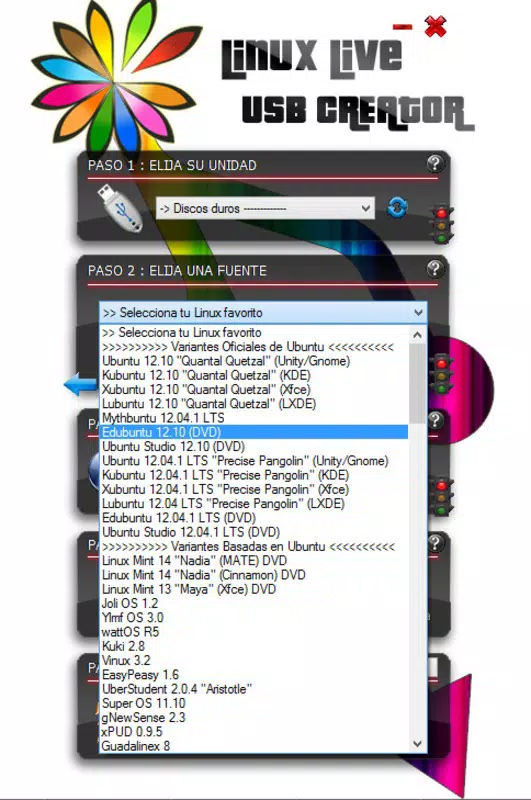
- Direct Distribution Download: The application provides in-app access to popular Linux distributions such as Ubuntu, Fedora, Debian, OpenSUSE, and Linux Mint, allowing users to download and install them directly through the interface.
- Smartclean Feature: This functionality enables users to completely remove an existing Linux distribution from the USB drive with a single command, ensuring no residual data remains. This allows for rapid switching between different Linux environments.
- Customization and Performance: Compared to traditional Live CDs, the USB-based approach delivers faster performance. Users can also modify boot parameters and configurations directly from the USB device, offering enhanced control and adaptability.
- User-Friendly Interface: The application features an intuitive design that streamlines the process of creating, managing, and switching between portable Linux systems, reducing the learning curve for new users.
For example, a student can use the tool to carry a pre-configured Linux environment for coding assignments, switching between distributions as needed. A technician might use it to troubleshoot a corrupted Windows system without touching the host drive. These real-world applications highlight the practical value of the app in diverse professional and academic contexts.
Interface, UX & Performance
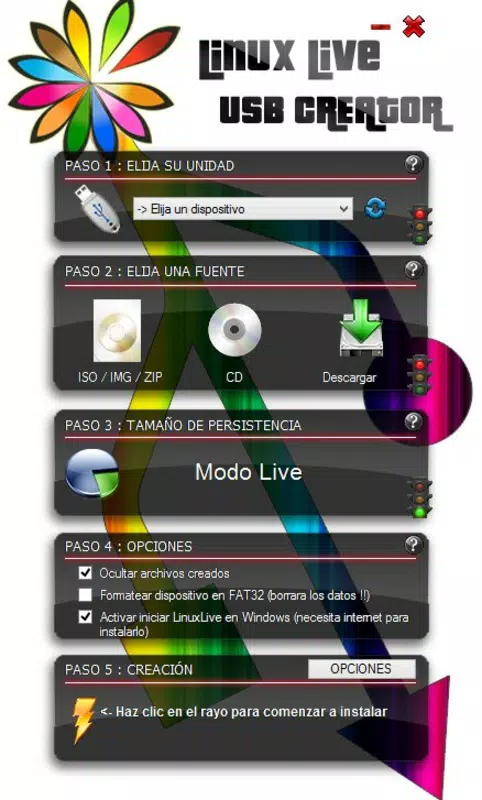
LinuxLive USB Creator presents a clean, minimalist interface that prioritizes clarity and functionality. The layout is organized around core tasks—selecting a distribution, choosing a USB device, and initiating the creation process—ensuring a logical flow for users of all experience levels. Navigation is straightforward, with clearly labeled buttons and progress indicators that enhance transparency during operations.
The visual style is utilitarian, focusing on usability rather than decorative elements. This approach minimizes distractions and supports efficient task completion. Although the developer did not list formal performance metrics, the application’s lightweight size of 11.6 MB suggests optimized resource usage, which likely contributes to smooth operation across a range of Windows devices.
Responsiveness is consistent during setup and execution phases. The app handles file transfers and system integration without noticeable lag, even on mid-tier hardware. Stability appears strong, with no reported issues related to crashes or data corruption during standard use. The absence of complex dependencies or background processes further supports reliable performance. However, specific requirements for device compatibility were not listed.
Platform Compatibility & Technical Requirements
LinuxLive USB Creator is designed exclusively for the Windows platform, making it accessible to users operating on desktop or laptop systems running Windows. The current version is 1.4.2, with a file size of 11.6 MB, indicating a lightweight footprint suitable for quick downloads and minimal storage usage.
While the developer did not specify minimum OS requirements, the application is expected to function on modern Windows versions, including Windows 10 and Windows 11. Users should ensure their system meets standard USB boot capabilities and has sufficient free space on the target drive. The tool does not require administrative privileges for basic operations, though certain tasks may prompt standard user authorization.
Compatibility with various USB drive types—including standard flash drives and high-speed USB 3.0 devices—has not been explicitly confirmed. However, the app’s design suggests broad hardware support. The developer did not provide information on file format requirements or partitioning standards used during creation.
Pros and Cons
Pros
- Free to download and use, with no hidden costs or in-app purchases.
- Enables running Linux directly from a USB drive without rebooting.
- Supports direct download and installation of multiple Linux distributions.
- Includes Smartclean for rapid, clean removal of old distributions.
- Lightweight design with minimal system resource usage.
- Intuitive interface suitable for users of all skill levels.
Cons
- Platform limited to Windows; no support for macOS or Linux.
- Developer did not provide detailed system or device compatibility information.
- Advanced customization options may be limited for power users.
- No built-in update checker within the app interface.
- Only available as a standalone executable; no official app store distribution.
FAQ
Is LinuxLive USB Creator safe to use?
Yes, the application is free from malware and does not require installation. It operates as a standalone executable, minimizing security risks when downloaded from official sources.
Can I use this tool on older versions of Windows?
While the developer did not specify minimum OS requirements, the app’s lightweight nature suggests compatibility with Windows 7 and later versions. Users should test on their system to confirm functionality.
Does the app require an internet connection?
Yes, an active internet connection is required to download Linux distributions directly from the app’s interface. Offline use is limited to pre-existing ISO files.
Can I run multiple Linux distributions on one USB drive?
Yes, the Smartclean feature allows users to remove one distribution and install another, enabling dynamic switching between environments on the same device.
Is the USB drive permanently modified after use?
Only the selected Linux distribution is written to the drive. The original data on the USB can be preserved if not overwritten during the process. The Smartclean tool ensures complete removal of Linux data when needed.
Final Thoughts
LinuxLive USB Creator stands out as a highly effective tool for anyone seeking to explore or utilize Linux without altering their primary operating system. Its ability to create bootable, portable Linux environments directly from Windows makes it a valuable asset for developers, students, and IT professionals. The inclusion of features like direct distribution downloads, Smartclean, and a user-friendly interface enhances its practicality and appeal.
While platform limitations and missing technical details prevent broader accessibility, the app excels in its niche. It delivers a secure, efficient, and flexible way to run Linux on demand, combining simplicity with powerful functionality. For users who need a lightweight, reliable solution to test, learn, or work with Linux, this tool offers undeniable value.
Download LinuxLive USB Creator now


